

It's not uncommon to feel a little sore in your lower back after working from home all day. Sometimes, after sitting at a laptop for a long time, that mild discomfort can gradually turn into stiffness or pain by the end of the day, making it difficult to stand up or move around normally. This experience is now becoming increasingly common among people working from home in many places, including Rugby.
Working from home brings several advantages. You can often choose more flexible working hours, avoid daily travel, and manage your work and personal life more easily. However, working from home can lead to back pain and posture problems if you don't have the right work environment and habits. The good news is that in most cases, back pain caused by working from home can be prevented and even managed with the right steps.
In this guide, we will discuss:
- Why does back pain occur when working from home
- Does remote work increase the risk of this problem?
- Some effective ways to reduce pressure on the back
- And when to seek professional help.
What Causes Working From Home Back Pain?
Back pain is a very common problem that can occur for many reasons. Sometimes it starts suddenly, like lifting something incorrectly or moving in an awkward position. In many cases, sitting in the same position for a long time, repeatedly doing the same thing, or maintaining incorrect posture can gradually build pressure on the back.
Certain factors can increase the risk of this problem when working from home, such as not having a suitable chair or table for the job, not having a properly arranged workstation, working on soft surfaces like sofas or beds, hunching over, or staying in the same position for long periods. When you don't move enough during the day, your back muscles can come under extra strain. Over time, these habits can put extra strain on your spine, back muscles, and supporting structures, leading to discomfort or pain.
Is Working From Home a Risk for Back Pain?
Working from home is not, in itself, a cause of back pain. Still, the risk of this problem can increase if you don't have the right work environment and regular exercise habits.
Many people are unable to use a proper ergonomic chair or workstation, whether in the office or at home. When you sit in an uncomfortable position for long periods, it can place extra strain on your back.
Various studies have shown that complaints of neck and back discomfort have increased among many people after the change from office to working from home. Sitting for long periods, working in poor posture, and not moving enough during the day can increase the risk of musculoskeletal problems, especially in the lower back and neck.
How to Reduce Your Risk of Work-From-Home Back Pain
Working from home doesn't mean enduring back pain. Small changes to your work environment, sitting posture, and daily habits can reduce the strain on your back.
1. Use ergonomic tools
A chair that provides proper support and a well-arranged workstation is important for back health. It is best to use a chair or desk that supports the natural curve of your spine, keeps your feet flat on the floor, and allows you to keep the screen at eye level. Having proper ergonomic support makes it easier to maintain good posture while working.
2. Place the screen at the correct height
If the laptop or screen is too low, it can put extra pressure on the neck and spine. So, position the screen so the top of the screen is close to eye level and allows you to keep your head in a normal position. If necessary, you can use a laptop stand or a monitor riser.
3. Pay attention to your sitting posture
Proper sitting habits play an important role in preventing back pain. Try to sit with your back supported by a chair, keep your shoulders relaxed, and keep your spine in a normal position. It is best to avoid slouching or leaning forward.
4. Take regular breaks to move around.
Even with a good workstation setup, sitting for long periods can still make your muscles feel stiff. So it's beneficial to take short breaks in between work. Many experts recommend breaking your work time into smaller chunks, for example, sitting for about 20 minutes, standing for a few minutes, and walking for a short time, or doing light stretching. Regular movement helps reduce body stiffness and maintain normal blood circulation.
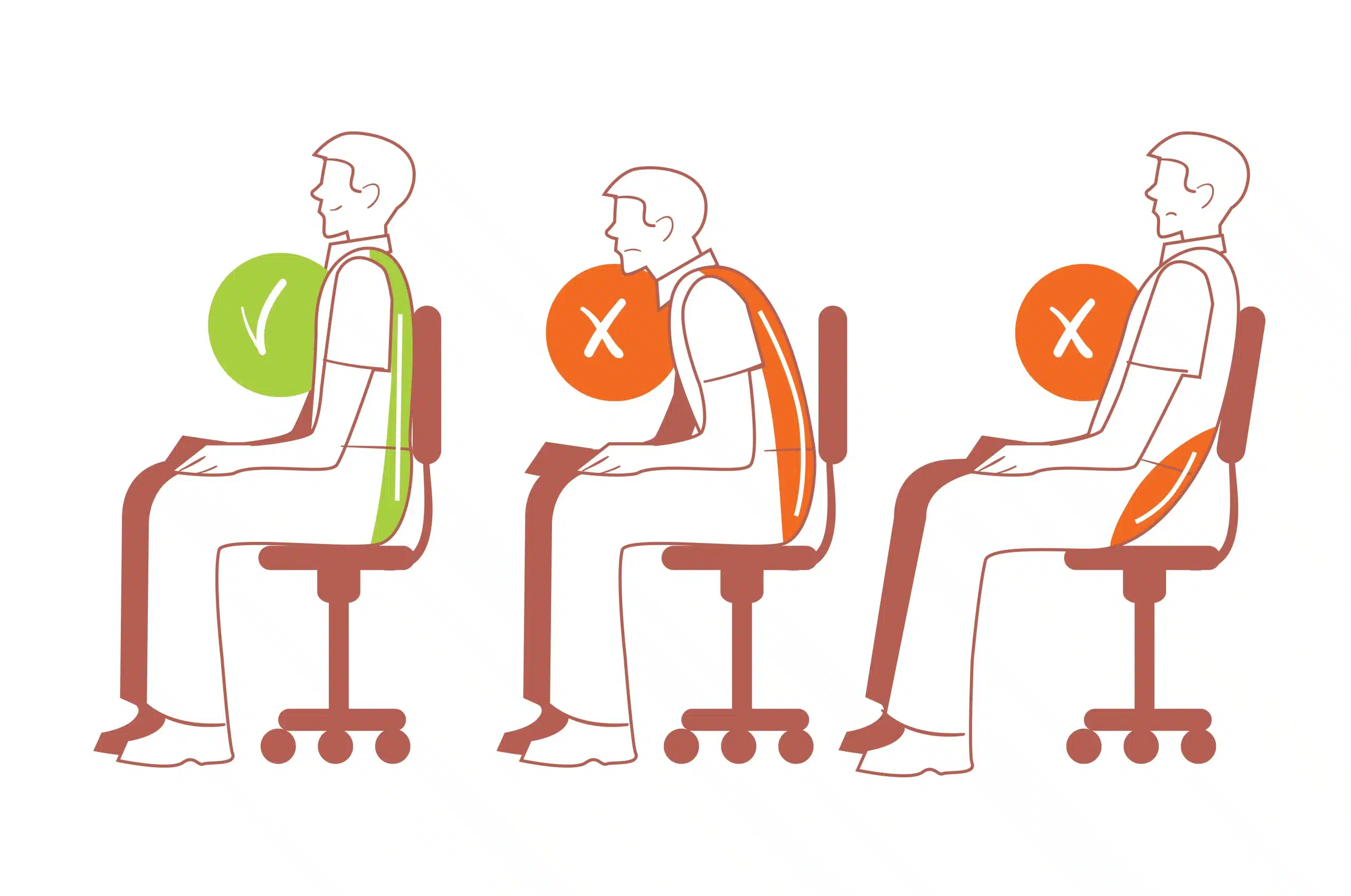
Tips for Healthy Sitting
Maintaining proper posture while sitting at work helps reduce unnecessary stress on the back. Keeping a few simple things in mind can help keep your body comfortable even when working long hours.
- Keep your feet flat on the floor for proper support.
- Try to sit completely back in the chair.
- Keep your elbows and forearms at the same height as the desk.
- Keep the screen at eye level.

Tips for Standing
Posture is also important when working standing up. Standing correctly can help reduce strain on your spine over long periods.
- Keep your head balanced just above your shoulders.
- Keep your shoulders relaxed.
- Keep your feet hip-width apart.

Tips for Moving and Stretching
Regular movement during the day reduces body stiffness and keeps muscles active.
Some simple ways could be:
- Short walks around the home workspace
- Light stretching of the back and shoulders
- Taking occasional breaks from the screen
What should you do next?
If back pain persists after adjusting your work environment and changing your daily habits, it may be beneficial to seek professional advice.
A physiotherapist can assess your posture, movement, and muscle strength to find the cause of the problem.
Often, getting proper treatment early can prevent a minor problem from becoming a major or long-term back problem.